Proteryx helps futures traders connect supported Tradovate workflows, create portfolios, route one lead trade across selected accounts, attach bracket orders, monitor P&L, and manage execution from a web-based Trade Desk.
This page focuses on Tradovate account routing. For the full platform overview, visit the main Futures Trade Copier page.
Connect your supported Tradovate workflow and choose the account group.
Route one order across selected accounts with account-level sizing.
Most traders searching for a Tradovate trade copier want one of three things: copy one order across accounts, manage funded futures accounts with different sizes, or connect TradingView alerts to a cleaner execution workflow.
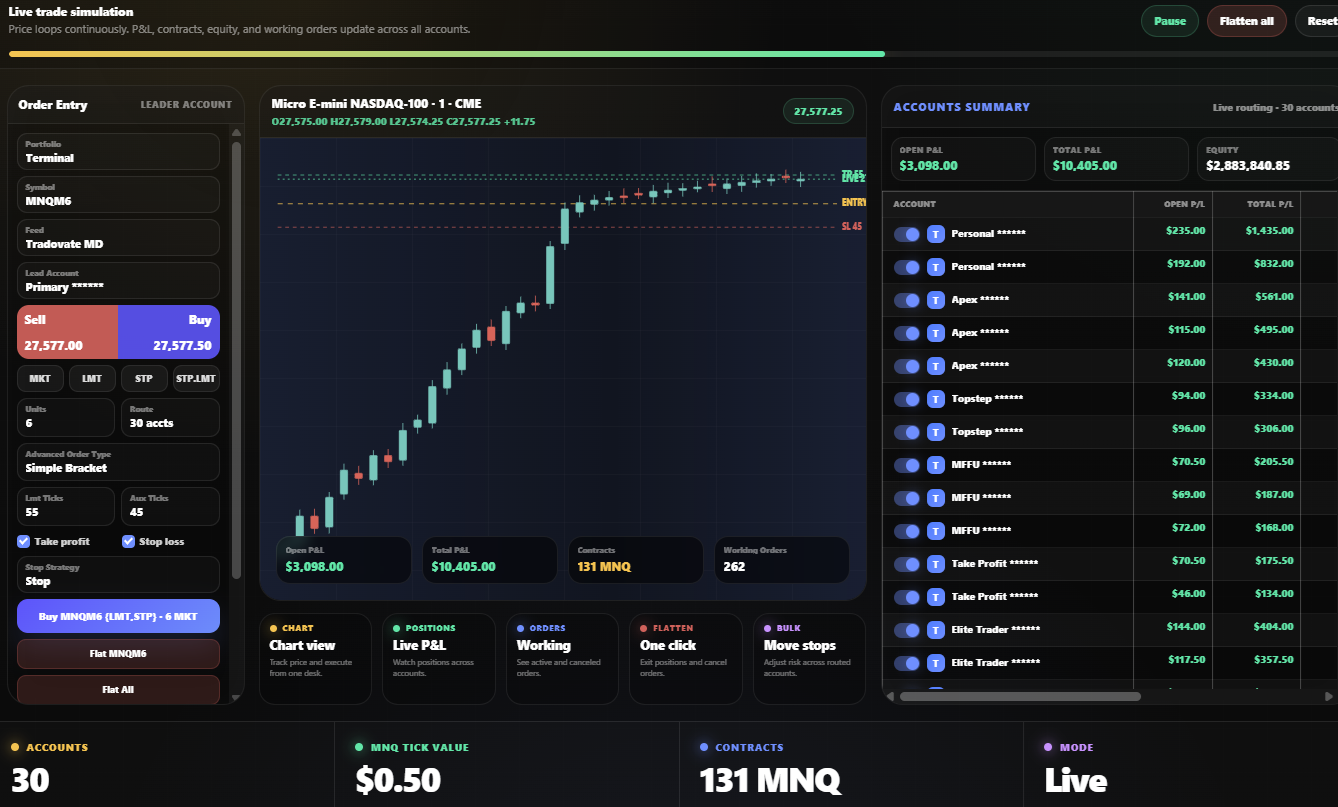
Choose the account that sends the original order, then route that order to selected accounts in the portfolio.
Trade accounts with different quantities so a smaller funded account does not need the same order size as a larger account.
Attach take profit and stop loss logic before sending the trade across your selected Tradovate accounts.
Track account summary, open P&L, total P&L, equity, positions, and working orders from the same desk.
Close selected accounts, one symbol, or a full routed portfolio when you need to get flat and cancel working orders.
Group accounts by firm, strategy, account size, or risk profile before you send any order.
Proteryx keeps the process simple. Connect a supported Tradovate workflow, create a portfolio, choose the lead account, set order rules, then trade from the Trade Desk.
A basic copier may send the same order from one account to another. Proteryx adds the surrounding trade management that active futures traders usually need, including account grouping, lead account routing, bracket logic, account summary, positions, orders, and flatten controls.
That is why this page links back to the main Futures Trade Copier page. Tradovate is one broker workflow inside the broader Proteryx multi-account execution system.
Funded account traders often deal with different account sizes, rules, drawdown limits, and firm restrictions. Proteryx helps organize the execution workflow, but every trader must follow their broker and prop firm rules.
Before choosing a Tradovate trade copier, check whether it only copies orders or whether it helps you manage the full multi-account execution workflow.
Many traders want to connect TradingView alerts to Tradovate execution. Proteryx supports TradingView alert automation workflows and connects them with account routing, brackets, and portfolio controls.
A TradingView alert can define the signal. Proteryx helps turn that signal into a controlled order workflow that can include account selection, quantity, take profit, stop loss, and route selection.
For the broader alert workflow, review the Proteryx TradingView automation page.
These internal links help traders and search engines understand how the Tradovate page connects to the main Proteryx futures copier topic.
See the main Proteryx futures trade copier page for multi-account execution.
Review supported broker connections available for Proteryx workflows.
See account summary, orders, positions, bracket controls, and flatten actions.
Review plans and start your first week with code FREE.
Connect alert-driven workflows with execution, routing, brackets, and account controls.
Learn how futures copy trading differs from simple order entry and signal following.
These answers match the questions traders usually ask before using a Tradovate trade copier for multiple futures accounts.
A Tradovate trade copier helps route a trade instruction from one lead account to one or more selected accounts. Traders use it to reduce repeated manual order entry when managing multiple futures accounts.
Proteryx is built for supported Tradovate workflows where traders can connect accounts, create portfolios, select a lead account, and route trades across selected accounts.
Proteryx can help organize multi-account futures workflows, but each trader must follow the rules of their broker, prop firm, and account provider. Always check your account rules before using any copier, automation, or multi-account execution tool.
Proteryx supports workflows with take profit and stop loss logic. Traders can build execution around order type, quantity, brackets, stops, targets, and routing rules.
Proteryx includes flatten workflows for selected accounts, symbols, or portfolio-level actions. Traders should still monitor their broker account directly and understand how each order is handled.
No. Tradovate is one supported workflow inside Proteryx. The broader product is a Futures Trade Copier and Trade Desk for multi-account futures execution.
No. Proteryx is an independent platform. References to Tradovate describe supported workflows and broker connectivity inside Proteryx.
No. A copier can help organize execution, but it does not improve a trading strategy by itself and does not guarantee profits. Futures trading involves risk, including the risk of loss.
Start your first week with code FREE. Connect a supported Tradovate workflow, create portfolios, route trades, use brackets, and manage execution from the Proteryx Trade Desk.