Proteryx helps futures traders copy one lead trade across selected accounts, manage portfolios, control account sizing, attach bracket orders, monitor P&L, and handle execution from a web-based Trade Desk.
Because many traders manage multiple accounts at once, copy trading for futures can reduce repeated order entry. Traders can spend more time managing execution, account groups, risk settings, and exits instead of clicking through each account.
Last updated: May 7, 2026. Built for active futures traders who need cleaner copy trading, portfolio routing, and account-level execution control.
First, send one futures order from the account that drives execution.
Next, route the order with portfolio controls and account-level sizing.
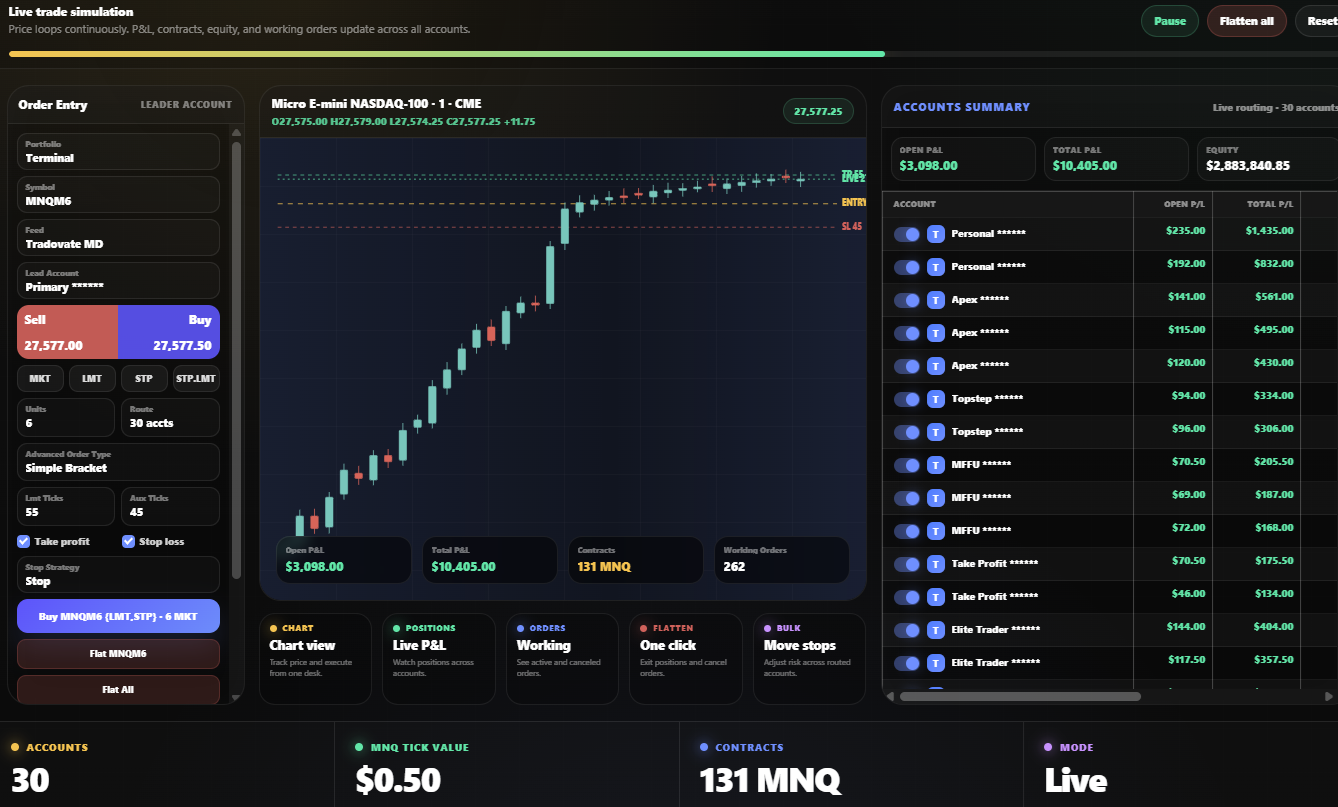
Futures traders often manage more than one account. Therefore, copy trading for futures helps them route one trade across selected accounts while keeping execution, sizing, brackets, and exit controls organized.
First, choose the account that drives execution. Then, route that trade to selected follower accounts.
Also, use account-level quantity rules so smaller accounts and larger accounts do not need the same size.
In addition, attach take profit and stop loss logic before routed orders reach your selected accounts.
Meanwhile, review account summary, open P&L, total P&L, equity, positions, and working orders.
When conditions change, close positions and cancel working orders across one symbol, selected accounts, or the full portfolio.
For example, group personal accounts, prop firm accounts, funded accounts, and strategy accounts before copying trades.
Copy trading for futures makes sense when you already have a defined trading process and need to apply it across more than one account. For example, you may trade one lead account while routing smaller sizes to funded accounts, personal accounts, or strategy accounts.
However, traders should avoid copying trades without clear rules. Before sending any order, check your account size, drawdown limits, broker rules, prop firm rules, order type, stop loss, and target logic.
Proteryx gives traders a clear route from account setup to live execution. First, connect your broker. Then, group accounts, choose a leader, attach risk rules, and manage the trade from the Trade Desk.
Before the trade is copied, Proteryx helps you define the route. In practice, that means choosing the leader account, selecting follower accounts, checking order size, and confirming the bracket logic.
After the trade is active, the Trade Desk helps you review account summary, positions, open P&L, working orders, and flatten actions. Therefore, you can manage the trade without jumping between every account view.
Copy trading works better when the route is controlled. For that reason, futures traders need to decide which accounts follow, how much size each account receives, which bracket orders attach, and how positions can be closed if the trade changes.
Funded account traders often manage different drawdown rules, account sizes, and execution limits. Therefore, Proteryx helps organize those accounts before the trade is sent.
Even with copy trading, account rules still matter. Therefore, you should confirm whether your broker or prop firm allows your intended workflow before you copy trades across funded futures accounts.
In addition, every copied trade should have a clear plan. That plan should include the market, symbol, order size, target, stop loss, account group, and exit method.
Before using any copy trading setup, check whether it supports the full workflow around order routing, account sizing, brackets, P&L visibility, and exit control. Otherwise, you may still need to manage too many parts manually.
A basic copier may send the same order to multiple accounts. However, the trader still needs to manage sizing, brackets, positions, and account status after the order is placed.
That is why Proteryx focuses on the full execution workflow. In addition to copy routing, traders can use account groups, order logic, live account data, and flatten controls.
Learn how Proteryx connects copy trading for futures with futures trade copying, prop firm workflows, Tradovate and NinjaTrader workflows, TradingView automation, pricing, and the Trade Desk.
Start here to see how Proteryx routes one lead trade across selected futures accounts.
See the broader account routing workflow for traders managing several futures accounts.
Review prop firm copy trading workflows, account rules, sizing, and funded futures controls.
Review the Tradovate-focused workflow for multi-account futures execution.
See how NinjaTrader-connected workflows fit into multi-account futures trading.
Send TradingView alert workflows into supported futures execution and routing setups.
These are common questions traders ask before copying trades across futures accounts. Also, they help clarify where Proteryx fits inside a trading workflow.
Copy trading for futures means routing a trade instruction from one lead account to one or more selected follower accounts. As a result, traders can reduce repeated order entry across multiple futures accounts.
First, Proteryx lets traders connect supported brokers. Then, traders can create portfolios, choose a leader account, select follower accounts, set order rules, and manage copied trades from the Trade Desk.
Proteryx can help organize multi-account futures workflows. However, each trader must follow the rules of their broker, prop firm, and account provider. Always check your account rules before using any copier or automation tool.
Yes. Proteryx supports workflows with take profit and stop loss logic. Therefore, copied trades can include bracket-style risk controls when configured.
Yes. Proteryx is built around portfolio and account-level controls. Because of that, follower accounts can be organized and sized based on the trader’s setup.
Proteryx includes flatten workflows for selected accounts, symbols, or portfolio-level actions. Still, traders should monitor their broker account directly and understand how orders are handled.
No. Copy trading can help organize execution, but it does not improve a strategy by itself and does not guarantee profits. Futures trading involves risk, including the risk of loss.
They are closely related. Copy trading for futures describes the workflow of sending a leader trade to follower accounts. A futures trade copier is the software layer that helps route and manage those trades.
Check whether your prop firm allows copy trading, automation, API execution, multiple account routing, bracket automation, and third-party platforms. Rules can change, so review the current account agreement before trading.
Yes. Proteryx supports TradingView alert automation workflows. Traders can use alerts as one part of a broader setup that includes account routing, portfolio controls, brackets, and Trade Desk monitoring.
Start your first week with code FREE. Then, connect your broker, create portfolios, copy trades across selected accounts, use brackets, and manage execution from the Proteryx Trade Desk.