Proteryx helps futures traders turn TradingView alerts into routed futures orders with portfolio controls, account-level sizing, bracket logic, live P&L monitoring, and Trade Desk execution.
TradingView automation helps connect strategy alerts, indicators, and webhook messages to a controlled futures trading workflow. Proteryx gives traders a way to define the alert fields, choose the account route, attach risk logic, and monitor execution after the alert fires.
Last updated: May 7, 2026. Built for futures traders who want cleaner TradingView alert automation with account-level controls.
Your alert fires from a strategy, indicator, or custom condition.
Proteryx reads symbol, side, quantity, order type, stop, target, and route.
The order routes to selected accounts with attached account rules.
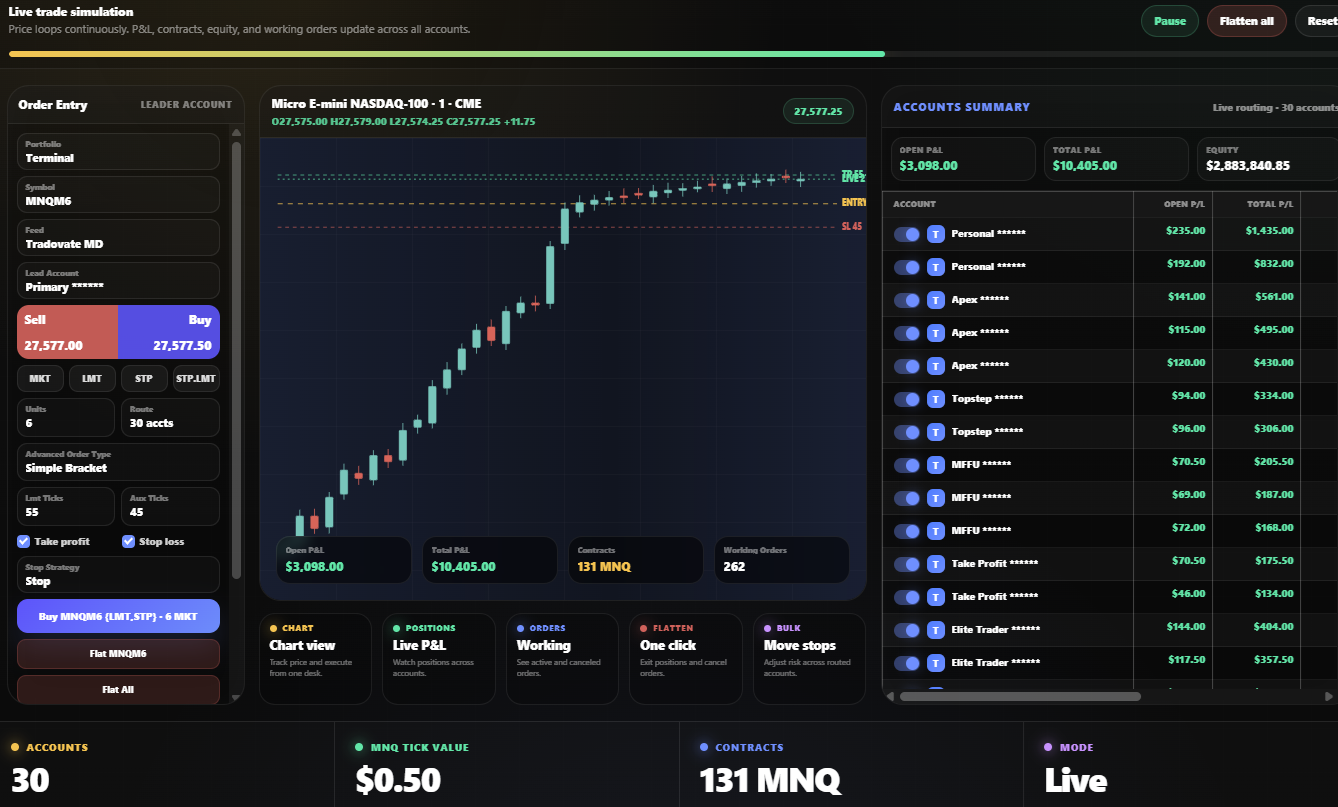
TradingView automation helps traders turn chart conditions into structured execution workflows. Instead of watching every signal manually, traders can send alerts into a route that can check the account, symbol, order type, and risk rules.
Create alerts from strategies, indicators, breakouts, reversals, or custom Pine Script conditions.
Use configured fields such as symbol, side, quantity, order type, stop, target, and route.
Route the alert to the right portfolio, account group, symbol, broker connection, or strategy setup.
Add take profit and stop loss logic before routed orders reach selected futures accounts.
Review account summary, P&L, positions, orders, and working orders from the Trade Desk.
Flatten one symbol, selected accounts, or the full route and cancel working orders when needed.
TradingView automation makes sense when your signal logic is clear. You may use a strategy, alert condition, or indicator setup that sends a consistent message when your setup appears.
Do not send live orders from unclear alerts. Before using automation, confirm the alert message, symbol, contract month, order side, quantity, stop loss, take profit, and account route.
Proteryx gives traders a clear route from TradingView alert setup to broker execution. Create the alert, send the webhook message, apply portfolio rules, attach risk controls, and manage the result from the Trade Desk.
{
  "symbol": "MNQM6",
  "side": "buy",
  "quantity": 6,
  "orderType": "market",
  "takeProfitTicks": 55,
  "stopLossTicks": 45,
  "portfolio": "Terminal",
  "route": "selected_accounts"
}
Test the message structure and confirm every field. Check the symbol, action, size, portfolio, stop, target, and account route.
Review account summary, open positions, working orders, P&L, and flatten options from the same Trade Desk.
Automation works better when the route is controlled. Futures traders need to decide which alerts can trade, which accounts receive the order, what size applies, what brackets attach, and how positions can be closed.
Funded account traders often need stricter execution control because account rules, drawdown limits, and order behavior matter. Proteryx helps connect alerts to a controlled workflow before any order reaches the account group.
Traders should confirm whether their broker or prop firm allows the intended alert workflow before routing live orders.
Every automated alert should be clear and repeatable. The alert should send the same fields every time, so the routing system can read it without guessing.
Before using any TradingView automation setup, check whether it supports webhook messages, portfolio routing, account sizing, brackets, P&L visibility, and exit controls.
A basic webhook can receive an alert message. The trader still needs to control symbol handling, account routing, brackets, order status, and position exits after the message is received.
Proteryx focuses on the full alert-to-order workflow. In addition to receiving TradingView alerts, traders can use portfolios, order logic, live account data, and flatten controls.
Learn how Proteryx connects TradingView automation with futures trade copying, copy trading, multi-account futures trading, prop firm workflows, Tradovate workflows, NinjaTrader workflows, and the Trade Desk.
Start here to see how Proteryx routes one lead trade across selected futures accounts.
Review how futures traders copy one lead trade to follower accounts.
See how Proteryx helps organize portfolios, account groups, and account-level controls.
Review funded account workflows with rule warnings and account-level routing.
See the Tradovate-focused workflow for multi-account futures execution.
Explore NinjaTrader-connected futures workflows and copier-style routing.
These are common questions traders ask before automating TradingView alerts for futures execution.
TradingView automation means using TradingView alerts to trigger a configured workflow outside the chart. Traders can send alert messages that define symbol, side, quantity, order type, stop loss, take profit, and routing instructions.
Traders create a TradingView alert and send that alert message to Proteryx, where portfolio rules, order settings, brackets, and account routing can be applied before execution.
Yes. Proteryx is built for multi-account futures workflows. A configured TradingView alert can route into selected portfolios or account groups when the trader has set the right rules.
Yes. Proteryx supports workflows with take profit and stop loss logic. A TradingView alert can be tied to bracket-style risk controls when configured.
Not always. Some traders use standard TradingView alert conditions, while others use Pine Script strategies or indicators. The alert message must include the right fields for the intended execution workflow.
Proteryx includes flatten workflows for selected accounts, symbols, or portfolio-level actions. Traders should still monitor their broker account directly and understand how each order is handled.
No. TradingView automation can help organize execution, but it does not improve a strategy by itself and does not guarantee profits. Futures trading involves risk, including the risk of loss.
No. Proteryx is an independent platform. References to TradingView describe alert and webhook workflows that traders can connect with Proteryx execution tools.
Start your first week with code FREE. Connect your broker, create portfolios, send TradingView alerts, use brackets, and manage execution from the Proteryx Trade Desk.