
Bracket orders for futures trading.
Proteryx helps futures traders plan entries, attach take profit targets, set stop loss exits, route accounts, and manage positions from one web-based Trade Desk.
A bracket order connects an entry with planned exits. First, you define the trade. Next, you add the target and stop. Then, you manage the position from one workspace instead of reacting late after the market moves.
Last updated: May 7, 2026. Built for active futures traders who need cleaner order planning, account routing, and exit controls.
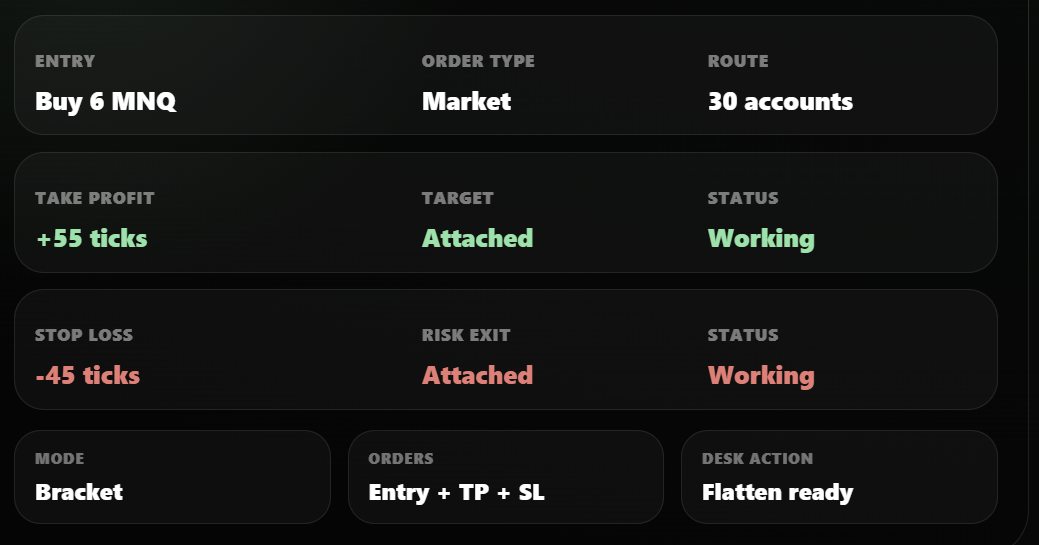
Plan the trade before the trade moves.
Bracket orders help futures traders prepare the entry and exits together. The order plan can include risk, target, account route, and management actions before the trade is active.
Set the entry
Choose the market, symbol, side, quantity, order type, and route before sending the trade.
Add take profit
Attach a target order so the planned profit exit is part of the workflow from the start.
Add stop loss
Attach a protective exit so the planned risk level is included before the position is active.
Route accounts
Send the same setup to one account, selected accounts, or a portfolio depending on your plan.
Monitor orders
Review account summary, open P&L, positions, filled orders, and working orders in the Trade Desk.
Manage exits
Use flatten actions, cancel working orders, and adjust trade management when conditions change.
When this workflow is useful
This setup helps when you want the entry, target, and stop prepared before execution. For example, an MNQ trade can include a target and protective exit before the trade reaches selected accounts.
What traders should check first
Every order still needs review. Confirm symbol, contract month, side, quantity, tick values, account route, order status, and broker behavior before trading live.
How bracket orders work inside Proteryx.
Proteryx helps you prepare the entry before the trade is sent. After the position is active, the Trade Desk helps you watch the order, position, and account-level result.
Simple bracket order preview
Prepare the entry and exits together before the trade routes to selected futures accounts.
Before the order is sent
Confirm the symbol, contract month, side, quantity, account route, take profit, stop loss, and time in force. Then, check that the selected accounts match the trade.
After the position is active
Monitor filled orders, working orders, open P&L, and account summary. If conditions change, use the Trade Desk to manage exits.
Bracket orders need more than entry buttons.
The entry is only one part of the trade. Proteryx also focuses on account route, live order status, working orders, and exit controls around the position.
Use TP and SL with account routing
Proteryx lets futures traders use target and stop logic inside a broader execution workflow. The same Trade Desk can support copy trading, TradingView automation, selected accounts, and portfolio-level routing.
Fields traders should review
Each setup should be checked before it reaches the market. Funded futures traders should also confirm the workflow follows the rules of their broker, account provider, and prop firm.
What futures order software should include.
Before using bracket orders for futures trading, check whether the platform supports entry, exits, account routing, order monitoring, and emergency actions.
Explore related futures execution workflows.
Bracket orders connect naturally with futures trade copying, TradingView alerts, broker workflows, funded accounts, and multi-account futures trading.
Bracket orders FAQ.
These answers explain how bracket orders work, what traders should check, and how Proteryx connects order planning with futures execution.
What are bracket orders?
Bracket orders combine an entry order with planned exit orders. Those exits usually include a take profit and a stop loss, so the trader can define the target and risk exit before the position is active.
How do bracket orders work in futures trading?
A trader chooses the futures contract, side, order type, and quantity. Then the trader adds a take profit and stop loss so the planned exits are part of the workflow.
Can Proteryx use bracket orders with copy trading?
Yes. Proteryx supports futures workflows that can include copy trading, account routing, and TP/SL settings. Traders can build workflows where take profit and stop loss logic are part of the routed trade.
Can TradingView alerts include take profit and stop loss?
Yes, when configured correctly. A TradingView alert can send order details that connect with futures execution workflows. Before using this live, confirm the alert message, symbol, side, quantity, target, stop, and account route.
Can I route the same bracket setup to multiple accounts?
Proteryx supports multi-account futures workflows. A trader can organize accounts and route trades based on selected account groups or portfolios. Each trader must still check broker rules, account provider rules, and prop firm rules before trading live.
Do bracket orders guarantee risk control?
No. Planned exits help structure a trade, but they do not guarantee fills, profits, or protection from loss. Futures markets can move quickly, and slippage, rejected orders, connectivity issues, and market conditions can affect execution.
What should I check before sending a bracket order?
Check the symbol, contract month, side, quantity, order type, take profit, stop loss, route, account group, and time in force. Also verify your broker connection and confirm that the order follows your account rules.
Does Proteryx provide financial advice?
No. Proteryx helps organize execution and account workflows, but it does not provide financial advice and does not guarantee trading results. Futures trading involves risk, including the risk of loss.
Start using planned exits inside your futures workflow.
Use code FREE at checkout when available. Then, connect your broker, set take profit and stop loss logic, route trades across selected accounts, and manage execution from the Proteryx Trade Desk.