Trade Desk
Manage charts, order entry, account summary, positions, working orders, brackets, and flatten controls from one web-based workspace.
Trade DeskWorkspace
Proteryx combines a web-based futures workspace, copy trading, portfolio routing, bracket orders, TradingView alert automation, account-level controls, and Trade Desk execution. You can move from chart signal to protected execution without rebuilding the same trade across every account.
These features support the full trading process: connect, route, protect, monitor, adjust, and exit. Each feature links back to the main Proteryx workflow.
Manage charts, order entry, account summary, positions, working orders, brackets, and flatten controls from one web-based workspace.
Turn configured TradingView alerts into futures execution workflows with symbols, sides, sizing, portfolios, and order rules.
Route one lead instruction across selected accounts using leader and follower logic, account scaling, and portfolio grouping.
Attach take profit and stop loss logic before the order is sent, where supported by your connected broker workflow.
Connect supported broker workflows and keep order routing close to account visibility and platform controls.
Group accounts by strategy, prop firm, account size, or risk profile before you route a futures trade.
View balances, equity, open P&L, total P&L, contracts, positions, and working orders in one place.
Close selected accounts, symbols, or routed positions from the Trade Desk when your workflow requires it.
Hide or show account names, equity, P&L, and related values when you record, stream, or trade in public.
Use Proteryx from a modern browser instead of relying on a heavy local desktop-only setup for the Proteryx workspace.
Organize funded and evaluation account workflows while checking each firm’s rules before using automation or copy trading.
Track market, limit, stop, bracket, working, filled, and canceled order workflows from a cleaner execution view.
These short definitions help traders and search engines understand how Proteryx connects alerts, accounts, orders, routing, and risk controls.
The Proteryx Trade Desk is the workspace where you can view charts, enter orders, monitor account summary, track positions, manage brackets, and use flatten controls.
Learn moreTradingView alerts are messages triggered by chart conditions, indicators, or strategies. Proteryx can use configured alert fields to route supported futures orders.
Learn moreCopy trading routes one lead trade instruction to selected follower accounts. In Proteryx, this can include account groups, custom sizing, brackets, and exits.
Learn moreBracket orders connect an entry order with planned exits, usually a take profit order and a stop loss order.
Learn moreBroker routing sends a configured trade instruction through supported broker or platform connections after account and symbol rules are checked.
Learn moreA flatten action is used to close selected positions and manage related working orders for an account, symbol, or portfolio route.
Learn moreConnect configured TradingView alerts to Proteryx, then route supported futures orders with portfolio rules, bracket logic, and account-level controls.
Proteryx checks the alert message, account route, symbol behavior, quantity rules, and bracket settings before preparing the matching futures order.
The Proteryx Trade Desk brings order entry, charts, live P&L, account summary, positions, brackets, and flatten controls into one web-based workspace.
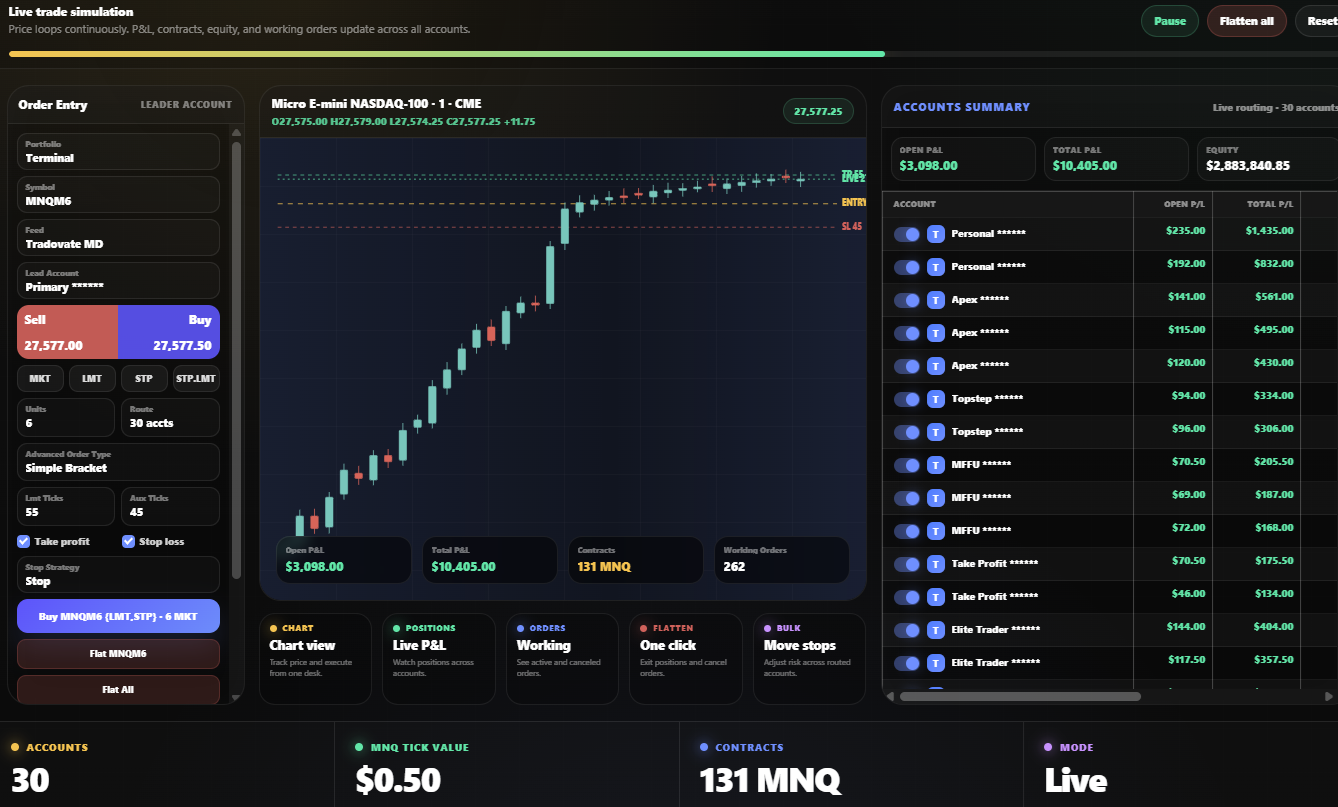
Manage orders, positions, contracts, connected accounts, P&L, and flatten actions from one web-based desk.
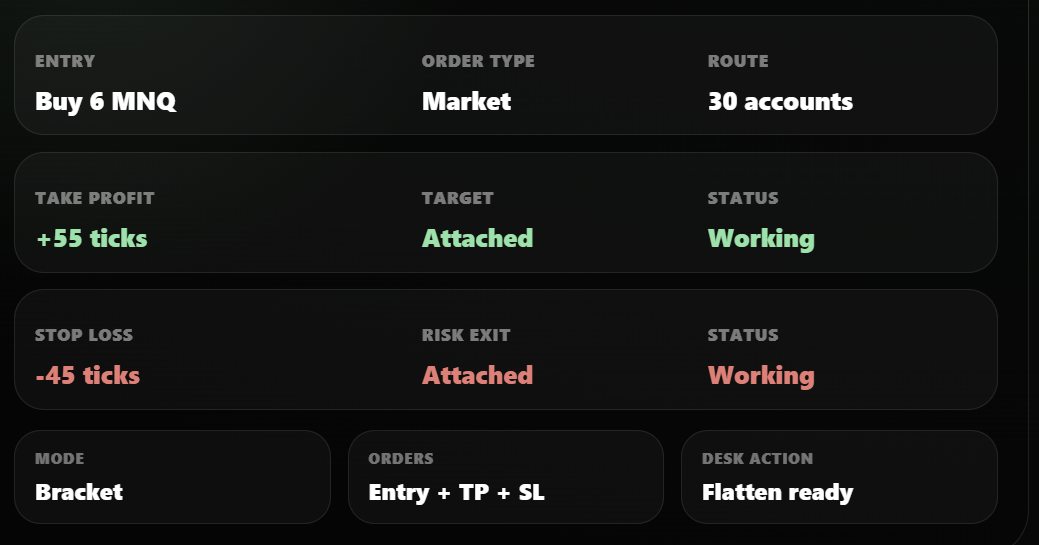
Attach take profit, stop loss, and trailing stop logic before the trade is sent to supported broker workflows.
Each feature supports the same process. First, define the account route. Then, attach protection. Finally, monitor execution from the same workspace.
Start with a supported broker path. Proteryx can then display accounts, routes, and execution controls.
Group accounts by strategy, prop firm, account size, or risk profile before you trade.
Attach take profit, stop loss, and order settings before the trade is sent.
Connect TradingView alerts to configured futures workflows when automation fits your plan.
Review how the Trade Desk, copy trading, bracket orders, TradingView alerts, account routing, and account controls fit together.
Proteryx includes futures trading automation features for Trade Desk execution, TradingView alert automation, copy trading, bracket orders, broker routing, portfolio controls, account visibility, flatten actions, and risk management workflows.
Yes. Proteryx can connect TradingView alerts to configured futures trading workflows, then route orders with bracket logic, portfolio rules, and account-level control.
Yes. Proteryx supports multi-account routing with leader and follower logic, account scaling, portfolio grouping, and account selection for futures trading workflows.
Yes. Proteryx supports bracket-style workflows with take profit, stop loss, and trade protection settings where the connected broker workflow supports them.
Yes. Proteryx is a web-based futures workspace, so traders can manage their workflow from a modern browser when their broker connection is set up.
Proteryx features are built for active futures traders, funded traders, prop firm traders, and users who manage several accounts or automate chart-based trading workflows.
Proteryx keeps broker access, account permissions, connected accounts, and protected web access close to the trading workflow so users can manage their setup from one web-based workspace.
The Proteryx Trade Desk shows order entry, chart view, live P&L, account summary, contracts, working orders, flatten controls, and multi-account routing from one web-based futures workspace.
Proteryx can help organize supported prop firm futures workflows, but every trader must review the rules of their prop firm, broker, and account provider before using copy trading, automation, or third-party tools.
No. Proteryx is a trading workflow layer. Your broker or platform still handles account access, market data, order handling, fills, fees, and account rules.
Start with one account. Then connect your broker, test the Trade Desk, attach bracket protection, and decide how Proteryx fits your futures trading workflow.